

DPO Radio

PERMANENT BLOCK
Permanently disable outdated, risky, or unnecessary technologies and prevent them from reactivating through plugins, updates, or consent actions.

Most WordPress sites carry old pixels, telemetry, or bundled stats that keep exporting data long after they are useful. Even with a banner and categories in place, these tools often wake up early, fire in the background, and continue to ship identifiers to third parties that visitors never heard of and did not really need. This becomes a bigger issue when those third parties collect telemetry or behavioral data that serves no purpose for the site owner, yet continues exporting information regardless of user intent.
Permanent Block changes that by giving you a hard stop, not just a delay. Instead of waiting for consent or relying on someone to remember a setting, you can mark specific domains, scripts, or plugin calls as permanently blocked. The system then intercepts those requests so they never execute in the browser, even if a user clicks “Accept All.”
For teams and agencies working with WordPress, this becomes a practical data minimization control. You keep what is essential for security, checkout, and content, while permanently retiring scripts, pixels, and plugin-added features that add risk, noise, or vendor complexity without serving the visitor. Over time, your stack becomes leaner, easier to explain, and simpler to audit.
Built for organizations where data protection meets performance

Enforces client blocking rules and safer default stacks.

Keeps retired pixels off while checkouts stay smooth.

Reduces unneeded third-party calls on sensitive flows.

Tames legacy trackers in complex tag and ad setups.

Limits exposure to external analytics vendors.

Cuts background calls that are not essential to patient care.

Reduces noisy exporters when reviewing client websites.

Blocks retired marketing tags across booking paths.
Permanent Block stops selected scripts and domains from loading at all on WordPress sites, so they can never run in the background.




Permanent Block lets you add specific domains, scripts, or plugin-based tools to a ermanent block list. Anything on that list is stopped before it loads, even if a user clicks “Accept All” or a plugin tries to re-enable it.
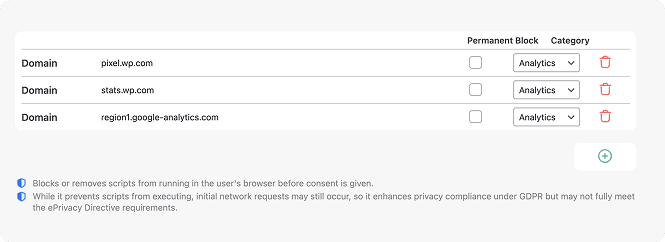
 After changes, run an AesirX Privacy Scanner check to confirm those scripts or domains no longer appear in the scan results.
Note that AI Auto-Blocking works for plugins and scripts loaded through WordPress’ standard architecture. Scripts hardcoded in theme files are not detected and must be added to blocking rules manually


 Old telemetry keeps exporting
 Retired endpoints never runPixels reappear after updatesRules persist across plugin changesConsent can re-activate exportersExporters stay off even after consentUnclear which vendors stay inactiveClear list of permanently blocked itemsRisk from unused third-party callsOnly essential traffic reaches the browser
 No unnecessary collection
 Consent-first behavior
 Cleaner data flows
AesirX CMP v2.0.2 adds Permanent Block - stop non-essential third-party collection for good. Data minimization, respect by default, one-minute setup.
READ MORE




Permanent Block creates a hard rule that prevents specific scripts, pixels, or domains from executing at any point in the consent flow. Instead of pausing activity until a user makes a choice, the feature intercepts outbound calls so they never load, initialize, or export data. This is particularly helpful on WordPress sites where plugins may add telemetry, bundled stats modules, old pixels, or third-party utilities that no longer serve a user-facing purpose. By removing these elements at the network layer, the feature supports stronger data minimization and control across your site without affecting core functionality.
Blocking until consent relies on user action. If a visitor opts into a category, scripts connected to that category may run immediately after. Permanent Block works differently. It deactivates chosen exporters entirely, even if a user clicks “Accept All,” so those domains and scripts stay off permanently. This makes it ideal for disabling legacy pixels, telemetry calls, marketing SDKs, or embedded tools that provide no essential benefit. The rule is one-way, persistent across updates, and shields your site from accidental reactivation. This approach functions as an irreversible data block for the specific technologies you retire.
Some plugins offer useful features but include extra tracking modules you do not want, such as analytics beacons, device profiling, or usage telemetry. Uninstalling the plugin might remove needed functionality, while leaving it active may reintroduce the data exports. Permanent Block solves this by letting you silence only the exporters you deem unnecessary. You keep the core features working while blocking specific domains, endpoints, or inline script calls tied to tracking behavior. This makes it especially effective when plugins bundle multiple roles or when a site inherits legacy tooling. It provides precise data usage restriction without breaking the rest of your setup.
Yes, but with a limitation. If a script is loaded through standard WordPress hooks or plugin architecture, Permanent Block can intercept its outbound requests cleanly. When a script is hardcoded directly into a template file, header, footer, or inline block inside a theme, it may not be fully detectable through automated scanning. In that case, you can still add the domain or path manually, but for complete control you may need to refactor those calls into a controllable hook or wrapper. Once they are routed through recognisable loading points, Permanent Block works normally, giving you reliable privacy-preserving data blocking.
Verification is simple. Run a baseline scan using AesirX Privacy Scanner and view the outbound calls, domain activity, and cookie behaviors recorded before making changes. Then enable Permanent Block for the endpoints you want to retire and run a second scan. If the rule is active, the previously listed domains, tracking pixels, or telemetry calls will no longer appear in the network findings. This before-and-after comparison gives you observable confirmation of what has changed in your site’s behavior and makes it easier to track internal decisions. The process acts as a practical privacy enforcement mechanism without implying any form of certification or legal assurance.


The evolution of Aesir is Aesir +  (the Norse symbol for Necessity)"Needed in order to achieve a particular result"
♥Join the AesirX Privacy Newsletter. Stay Informed. Stay Compliant.