

DPO Radio

 USER HANDLING
Assign the person’s Shield of Privacy ID so they can act as an admin and configure your analytics.

Teams often need more than one person to configure analytics, yet granting that access is usually tied to emails, passwords, or user accounts that introduce small but avoidable administrative tasks. When roles change or new collaborators join, someone must update logins, reset details, or manage credentials that are not core to analytics work. It adds friction and brings personal data into a space where it is not required.
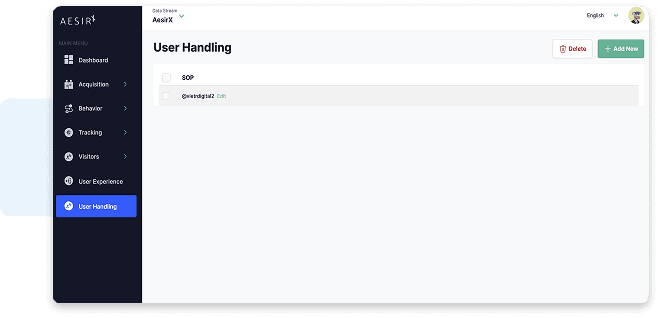
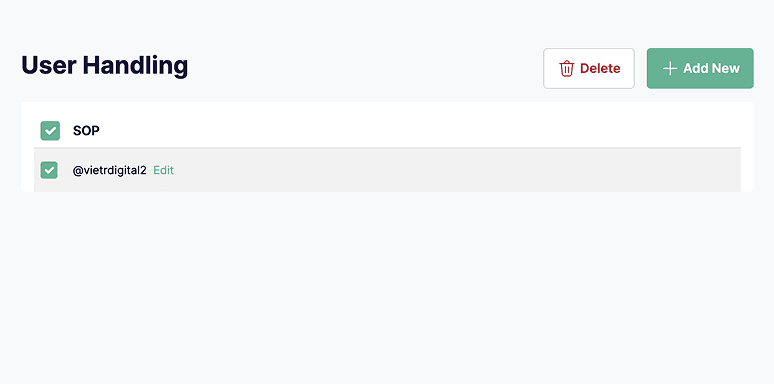
AesirX User Handling keeps this much simpler. To give someone admin rights, you add their Shield of Privacy ID to the User Handling screen. The feature records that ID as an administrator reference so they are allowed to configure analytics. No email fields, no password fields, and no extra profile data stored inside Analytics.
For organisations and agencies, this offers a practical benefit. It reduces the amount of information managed within the analytics environment, keeps access control lightweight, and makes it easy to update who can work with analytics configurations as teams and roles change.
Built for organizations where data protection meets performance

Quick admin updates as project teams shift.

Grant setup access without storing profiles.

Limit internal admin data to what is needed.

Add contributors without creating accounts.

Reduce stored admin details in analytics.

Keep admin access minimal and easy to adjust.

Control configuration rights with minimal data.

Update admin roles as staffing changes.
Add new admins by entering their Shield of Privacy ID for simple access control.
User Handling provides a clear way to manage who can configure AesirX Analytics. Instead of creating accounts, you add an administrator by entering their Shield of Privacy ID. This keeps the process lightweight and easy to update as teams change.
 User Handling
 User Handling
 Managing accounts means storing emails and passwords.
 Admins are added using a simple Shield of Privacy ID.Outdated admin profiles accumulate over time.No emails or passwords stored inside analytics.Access changes require constant credential edits.Access updates take seconds when roles change.Personal data sits in tools that do not need it.Stored admin information stays minimal by design.Role changes slow down who can configure analytics.Teams adjust configuration rights without friction.
 Clear access control
 Easy admin updates
 Consistent access flow
AesirX Analytics v1.0.1 adds Tag Event Value Mapping: assign metric and engagement values to first-party Tag Events directly in the Tag Manager
READ MORE
AesirX Analytics v1.0.0 introduces UTM Value Mapping to assign real monetary value to campaigns using first-party data, without third-party trackers.
READ MORE
Measuring value, not traffic, reframes analytics around outcomes. It highlights which journeys and campaigns create real business impact instead of empty activity.
READ MOREAesirX User Handling is an access management feature that lets you grant admin rights on the Analytics dashboard by adding a person’s Shield of Privacy ID.
No. You only add the person’s Shield of Privacy ID. No names, emails, or passwords are stored inside the Analytics dashboard.
You enter their Shield of Privacy ID in the User Handling screen. Once added, they can configure analytics settings.
Yes. Admin entries can be edited or removed at any time when team roles change.
As an AI privacy assistant, it reduces repetitive work by generating consistent, editable outputs every time a scan is run. This supports AI for privacy management, making it easier to update consent text, policy content, and cookie declarations whenever tracking changes.


The evolution of Aesir is Aesir +  (the Norse symbol for Necessity)"Needed in order to achieve a particular result"
♥Join the AesirX Privacy Newsletter. Stay Informed. Stay Compliant.