
DPO Radio

 HELP CENTER
Context-sensitive help available on every page, with module guides, workflow tutorials, FAQ resources, and direct support links.

A GRC platform that serves 10 different user roles across 29 modules and 7 regulatory frameworks will always have team members working in areas that are new to them. A Department Data Owner (P-VN-02) completing their first attestation section needs to know what a RoPA activity is and what information their team is expected to provide. A Telecom Regulatory Affairs Manager (P-VN-04) responding to an authority inquiry for the first time needs to understand the workflow steps and the evidence package format the regulator expects. A new team member on the Breach Response Lead's team needs to understand the incident workflow before they can contribute effectively.
Without embedded help, these users leave the platform to search for documentation, open support tickets for questions that a well-organized guide could answer, or proceed with incorrect assumptions that create errors in compliance records. The cost accumulates: a single DPIA section submitted with incorrect information can delay a Ministry of Public Security filing. A wrongly configured notification template can result in an authority inquiry response that fails to meet formatting requirements. An onboarding team member who cannot find guidance on a specific workflow may configure a case incorrectly, requiring rework.
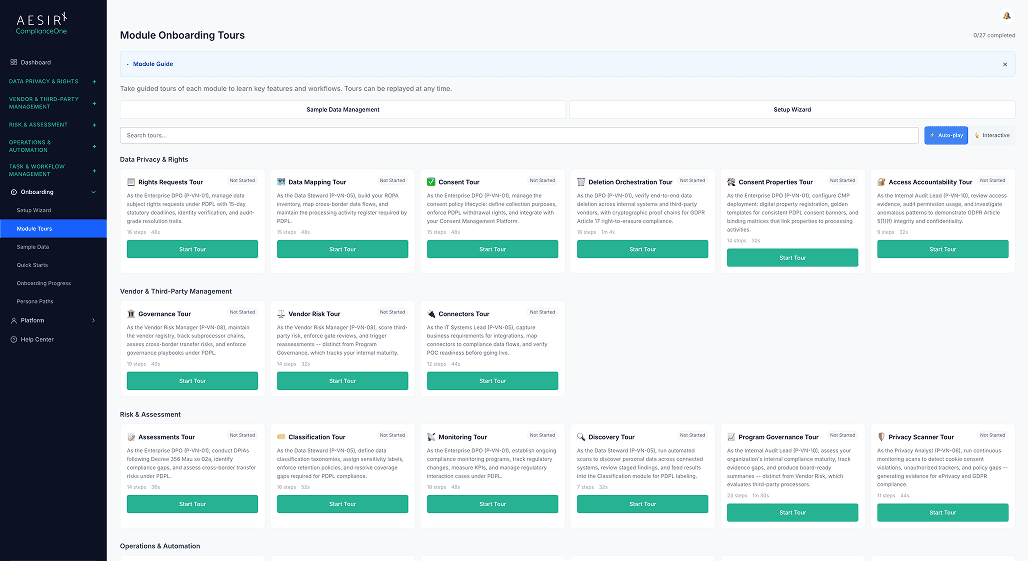
ComplianceOne's Help Center brings documentation, guides, and support resources directly into the platform. Rather than requiring users to navigate to an external knowledge base or open a separate browser tab, context-sensitive help links surface on each admin page, pointing directly to the guide most relevant to the user's current task. Module guides cover feature-specific help for every major module. Workflow tutorials walk through step-by-step processes for common tasks. FAQ resources address the questions compliance teams ask most frequently. And support channel links connect users to the assistance they need when self-service documentation is not sufficient.
The Help Center is a Light-tier module, so every ComplianceOne deployment includes it from day one, regardless of the organization's tier or module configuration.
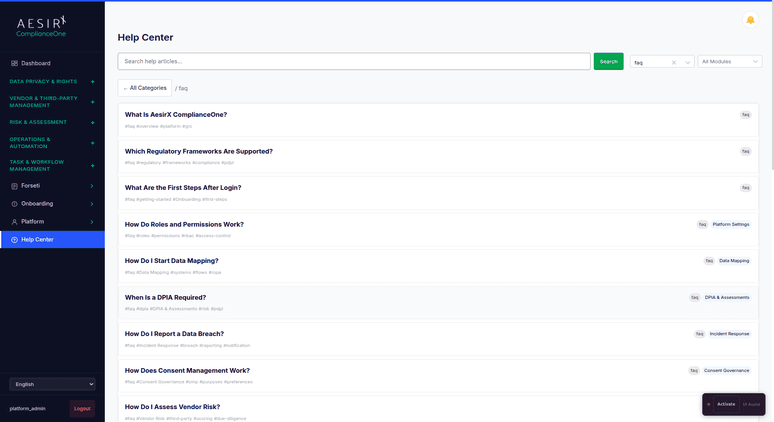
The documentation viewer renders help content directly within the ComplianceOne interface. Users access the Help Center without leaving the platform, keeping the compliance workflow in context while they find the guidance they need.
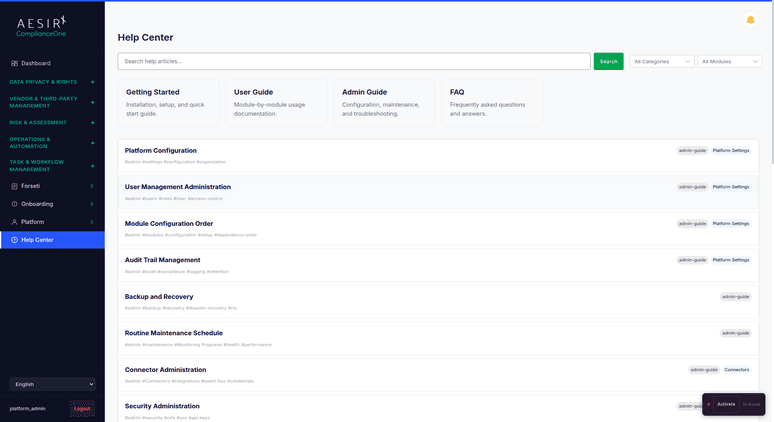
Feature-specific guides are organized by module, covering the key concepts, views, and tasks within each area of the platform. A guide for the Rights Requests module explains the seven-stage workflow, multi-department fulfillment, and statutory deadline management. A guide for the Audit Trail module explains evidence pack lifecycle, contributor lineage tracking, and audit period integrity verification. Guides reflect the actual capabilities of each module as deployed.
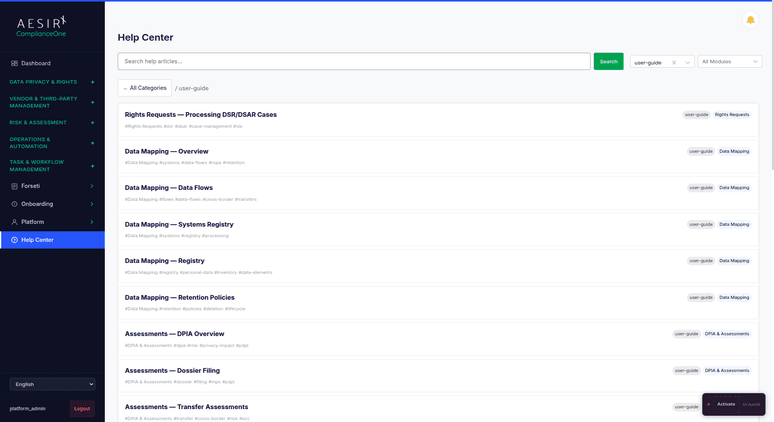
Step-by-step tutorials walk users through common compliance tasks from start to finish. Tutorials are structured around real workflows: creating and submitting a DPIA, configuring a vendor onboarding pipeline, completing a monitoring review cycle, or setting up a breach notification case. Each tutorial covers the sequence of actions, the data required at each step, and the expected outcome.
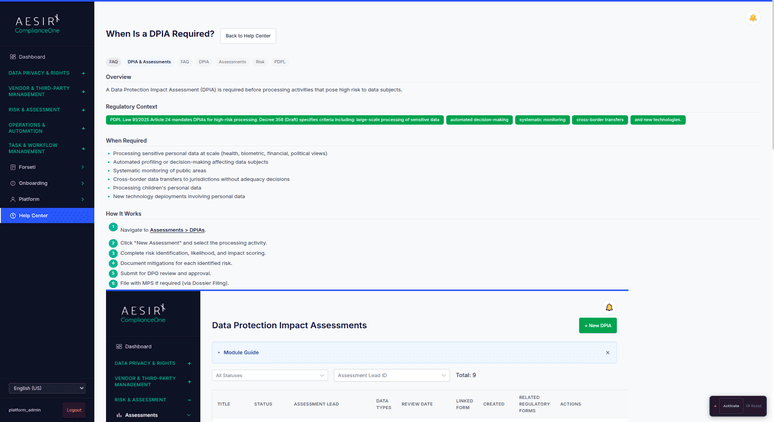
Frequently asked questions address the queries compliance teams raise most often about platform behavior, regulatory interpretation of platform features, and configuration options. FAQ content is organized by topic area and updated to reflect current platform capabilities.
 Users leave the platform to search external documentation sites, breaking their workflow context.
 Documentation, guides, and tutorials are accessible within the platform without switching browser tabs.Support tickets are opened for questions that structured in-product guidance could answer.Context-sensitive help links surface the most relevant guide for the current admin page automatically.Team members new to a module or workflow have no immediate reference point within the interface.Module guides provide feature-specific reference for every major area of the platform.Context-specific guidance requires users to know which documentation article to look for.Workflow tutorials walk through step-by-step processes so users complete tasks correctly on the first attempt.Support channel access requires navigating to a separate contact page or external resource.Support resources and links to assistance channels are accessible from within the Help Center.
The Help Center is implemented as a Light-tier module, meaning it ships in every ComplianceOne deployment and is available to every user from day one. There is no separate licensing requirement and no additional configuration needed to activate it.

Context-sensitive help is wired to the admin page structure of the platform, surfacing relevant guides based on the user's current location in the application. This means that guidance scales automatically as new modules are added to a deployment without requiring users to rebuild their knowledge of where to find documentation.

The help content system is managed through Help-Content Packs, which are JSON-pack-driven article sets administered through the Localization module. Administrators can view installed pack version, article count, and locale coverage, and reinstall updated content after authoring changes without requiring technical intervention.
Ready to see how ComplianceOne provides contextual documentation and workflow guidance directly within the platform? Request a personalized demo.

Ronni K. Gothard Christiansen - Technical Privacy Engineer & CEO
Technical Compliance Expert, 32+ Years Open Source Advocate, X-BoD Open Source Matters Inc.
Yes. The Help Center is a Light-tier module included in every ComplianceOne package. It is available to all users in all deployment tiers without additional configuration.
Each admin page in ComplianceOne includes help links that point to the guide or tutorial most relevant to that page. When a user is viewing the DPIA creation form, the context-sensitive link goes directly to the DPIA workflow guide. When a user is configuring a vendor review cycle, the link goes to the monitoring setup tutorial. Users do not need to search for the right article.
Help Center content is delivered through Help-Content Packs, which are managed through the Localization module. Administrators can view installed pack versions and reinstall updated content when article changes are published. The pack management interface is available without requiring direct system access.
The Help Center content system supports multiple locales through the Help-Content Pack architecture. ComplianceOne's help articles are available in the locales covered by the installed content packs, with Vietnamese and English as the primary operational languages.
Support resource links are available directly through the Help Center interface, connecting users to the appropriate support channels for issues that in-product documentation does not fully address.
See how in-product Help Center documentation supports your team during initial platform adoption and ongoing compliance operations.

Test playbook execution, SLA tracking, and evidence chain of custody with a real incident scenario.

Talk through your team's training and support requirements to understand how the Help Center fits your onboarding and day-to-day support model.


The evolution of Aesir is Aesir +  (the Norse symbol for Necessity)"Needed in order to achieve a particular result"
♥Join the AesirX Privacy Newsletter. Stay Informed. Stay Compliant.