

DPO Radio

DOMAIN PATH BLOCKING
Block scripts matched to domains or paths until a visitor chooses their settings, giving you precise control of third-party behavior on WordPress.

Most websites load scripts from many different sources, and not all of them come from plugins you can manage directly. Some arrive through themes, hard-coded embeds, CDNs, or external tools that activate the moment a page loads. These silent calls can trigger tracking, analytics, or advertising scripts before a visitor has a chance to make a consent choice. For site owners, this creates risk and makes it hard to prove that third-party technologies are handled responsibly.
Domain Path Blocking on AesirX CMP for WordPress solves that gap by letting you target and control scripts based on the domain or path they originate from. If a script matches your rules, it is prevented from executing in the browser until the user has consented to its category. This supports the GDPR’s consent requirements and helps reduce privacy exposure where plugin-based blocking is not enough.
For businesses, it improves operational consistency, cuts configuration time, and delivers predictable behavior across large sites where mixed script sources are common. It gives teams a clear, dependable way to govern third-party behavior.
Built for organizations where data protection meets performance

Target problem domains across custom client builds.

Stop marketing scripts loading before consent.

Prevent analytics scripts on sensitive journeys.

Control embeds and ad-tech tied to specific hosts.

Limit third-party calls on public services.

Reduce exposure from external widgets and tools.

Govern third-party scripts on advice and intake pages.

Block tracking tied to booking and review tools.
Block scripts from specific domains or paths until visitors choose their consent settings.




You set a domain or path rule for any script. Domain Path Blocking checks each script request and prevents matching scripts from executing in the browser until the user consents to that category.
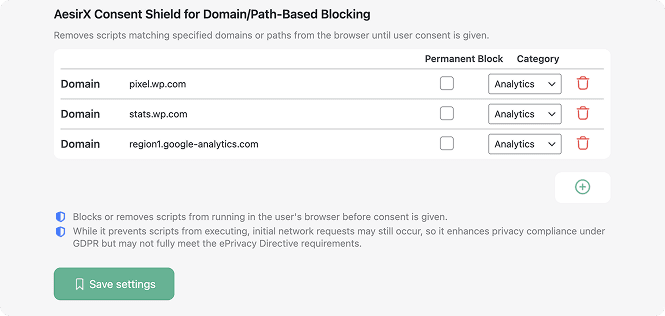
 Use part of the URL to block a whole group of related scripts.
Note that AI Auto-Blocking works for plugins and scripts loaded through WordPress’ standard architecture. Scripts hardcoded in theme files are not detected and must be added to blocking rules manually


 Hidden script activity
 Precise domain controlHard-coded embeds runBlocks non-plugin scriptsFragmented controlsGrouped rules for easier activationHigher privacy exposureConsistent script behaviorUnpredictable behaviorCleaner pre-consent setup
 Consent-first flow
 Reliable control
  Consistent results
AesirX Consent Management Platform (CMP) for WordPress v1.3.0 release, introducing category-based and granular consent controls.
READ MORE




AesirX Domain Path Blocking lets you block tracking before it loads by matching scripts to a domain or path you specify. If the script URL fits the rule, it is prevented from executing in the browser until the user consents to that category. This gives you practical domain-level script blocking.
Yes. AesirX Domain Path Blocking is ideal when you need to block tracking by domain path for technologies loaded through themes, CDNs, hard-coded HTML, or direct script tags. It allows you to restrict third-party domains pre-consent even when no plugin is involved.
It stops execution, not every network call. Domain Path Blocking can block domain calls before execution, but some initial requests may still occur. This provides safer domain-based tracking control under a consent-first model while avoiding claims about full GDPR or ePD compliance.
On WordPress, Domain Path Blocking helps you control plugin-free tracking paths that appear outside plugin architecture. It gives you consistent path-based script restriction across themes, page builders, and custom code so tracking does not run until consent is chosen.
Yes. When rules are configured, Domain Path Blocking can prevent data calls to third-party domains by stopping the scripts that attempt to run. It does not promise compliance outcomes, but it strengthens your ability to enforce domain restrictions under GDPR/ePD by controlling when scripts can activate.

The evolution of Aesir is Aesir +  (the Norse symbol for Necessity)"Needed in order to achieve a particular result"
♥Join the AesirX Privacy Newsletter. Stay Informed. Stay Compliant.