
DPO Radio
Core GRC Modules for Compliance Operations | AesirX ComplianceOne
 CORE MODULES
The Operational Backbone for Every ComplianceOne Deployment
Dashboard, Onboarding, Platform Administration, Help Center, and Forseti AI work together to give compliance teams the visibility, guidance, access control, and auditable support they need from day one.
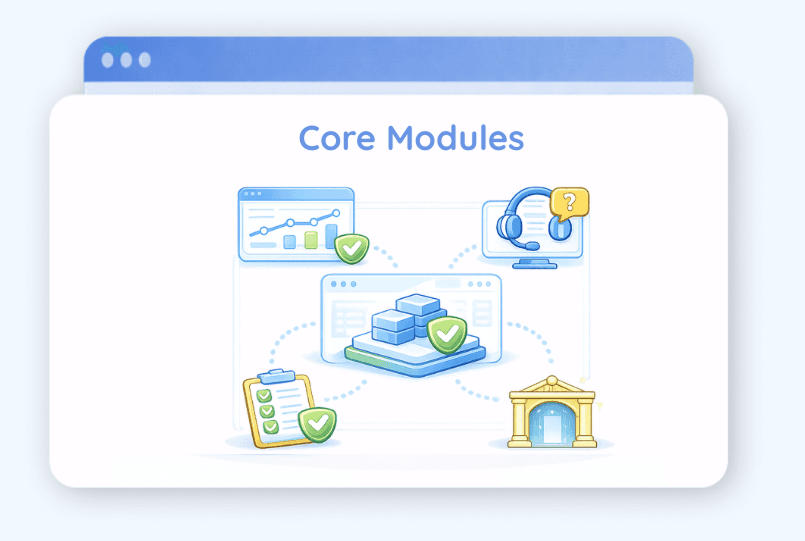
ComplianceOne doesn’t just give you compliance modules. It gives you the operational layer that makes compliance executable across the organization.
What are ComplianceOne Core Modules?
ComplianceOne Core Modules are the shared foundation used across every ComplianceOne deployment. They include Dashboard, Onboarding, Platform, Help Center, and Forseti AI. Together, they help compliance teams monitor program health, configure users and roles, guide new team members, access contextual support, and receive citation-grounded AI compliance guidance.
Built for the teams that run compliance daily
Core Modules support DPOs, Compliance Managers, Legal Counsel, Internal Audit, Risk Teams, IT Administrators, Department Data Owners, and Executives who need visibility into compliance progress and accountability.
Compliance fails when the foundation is missing
Even strong compliance workflows break down when teams lack visibility, role clarity, guided setup, access governance, and reliable in-platform support. Core Modules solve this by giving every ComplianceOne deployment a shared operating layer for daily compliance execution.
Why Core Modules Matters
A GRC platform is only as effective as its daily operational foundation. Compliance teams need a real-time view of program health before they can prioritize their work. New users need a guided path into the platform before they can contribute to a live DPIA or respond to a regulatory inquiry. Administrators need a single place to manage accounts, roles, and security policies before workflows can be safely delegated. And when a team member is unsure how to complete a task, they need accurate, contextual help without leaving the platform.
Without this foundation, even the most capable compliance modules struggle to deliver value. A breach response breaks down when role assignments are not configured. A regulatory filing stalls when the DPO cannot see which departments have outstanding tasks.
ComplianceOne's Core Modules provide this foundation for every deployment tier and team size:
- Dashboard: 13 configurable widgets across three sections, with a framework filter and per-user layout preferences.
- Onboarding: 10 persona-based paths with tier-aware configuration and guided quick-start scenarios.
- Platform: user and access management, MFA, SoD, notifications, file storage, and module configuration in one interface.
- Help Center: contextual documentation, module guides, and workflow tutorials surfaced directly within the platform.
- Forseti: citation-verified AI compliance guidance grounded in installed regulatory packs, available from Light tier upward.
Together, the Core Modules ensure every team member, from the Enterprise DPO to a Department Data Owner, can orient themselves, understand their responsibilities, and act with confidence from day one.
Built for Multi-framework Compliance


Core Modules

Dashboard
See compliance health, tasks, risks, & framework-specific progress

Onboarding
Guide each role into the right setup & first workflows

Platform
Manage users, roles, access, MFA, notifications, storage, & module configuration

Help Center
Keep users productive with contextual help & workflow guidance

Forseti AI
Provide citation-grounded compliance guidance inside the platform
Dashboard
Configurable compliance command center with 13 widgets and framework filtering
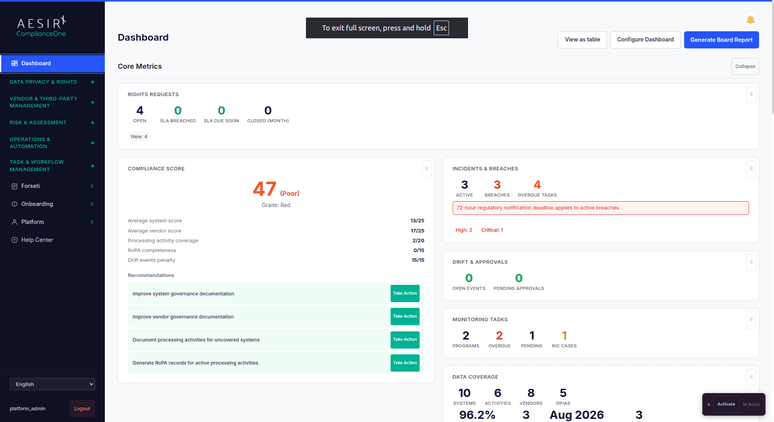
A single-page view of compliance health across all active modules. The Dashboard organizes 13 purpose-built widgets into three collapsible sections (Core Metrics, Task Management, Compliance Insights), with a framework filter that scopes every widget to a single regulatory framework and a configuration panel so users show, hide, and reorder widgets to match their workflow.
Help Center
In-product documentation, module guides, and workflow tutorials available on every page
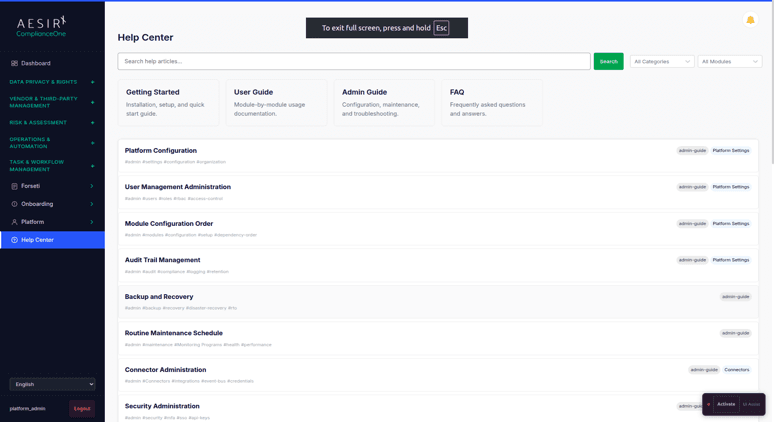
Contextual help surfaced directly within the platform. The Help Center provides module-specific guides, step-by-step workflow tutorials, and FAQ resources accessible without leaving the current page, reducing time spent searching external documentation for answers.
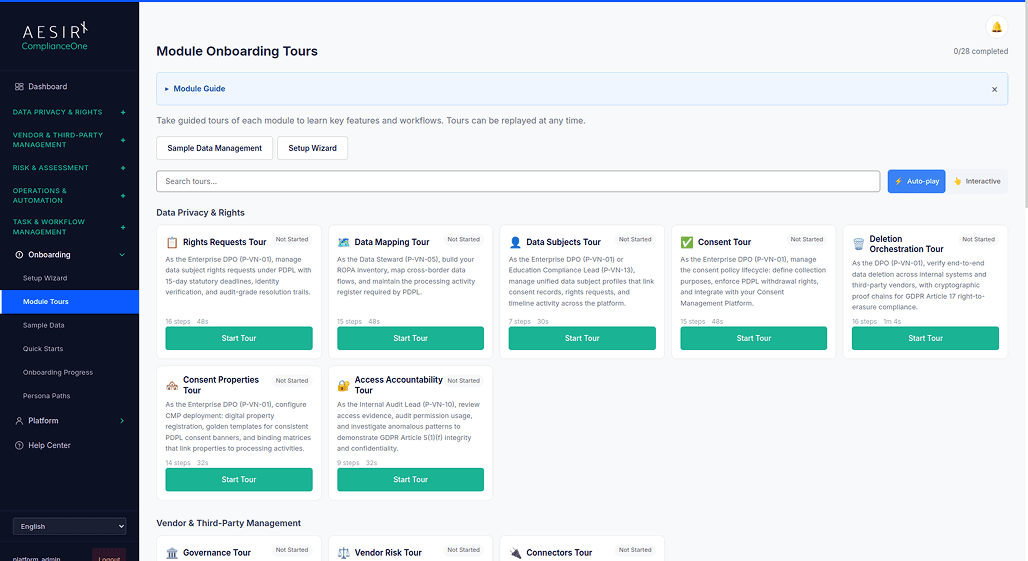
Onboarding
10 persona-based setup paths with tier-aware configuration and guided quick-starts
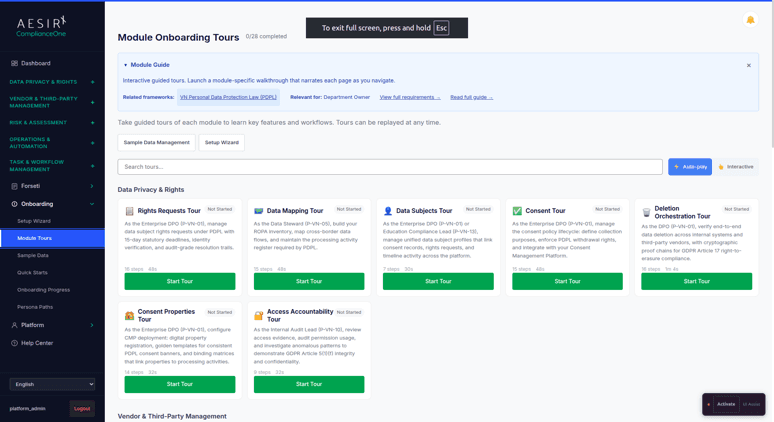
Guided setup that adapts to each team member's role, deployment tier, and regulatory framework selection. Ten persona-specific onboarding paths recommend the right modules, framework configurations, and first tasks for every role from Enterprise DPO to Internal Audit Lead, with ten quick-start scenarios walking users through real compliance workflows step by step.
Platform
User management, access governance, security controls, notifications, and module configuration
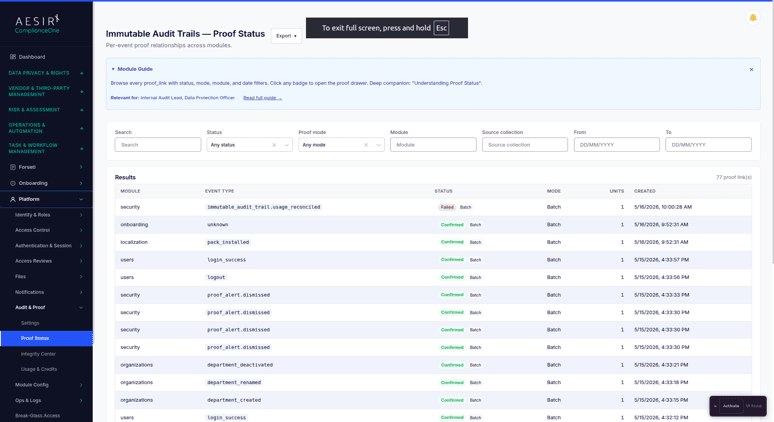
The administrative backbone of every ComplianceOne deployment, covering user accounts, roles, permissions, MFA, SSO, segregation of duties, access review campaigns, file storage, and platform-wide module configuration. The Immutable Audit Trails sub-feature adds cryptographic anchoring of audit events on the Concordium blockchain for organizations requiring verifiable proof.
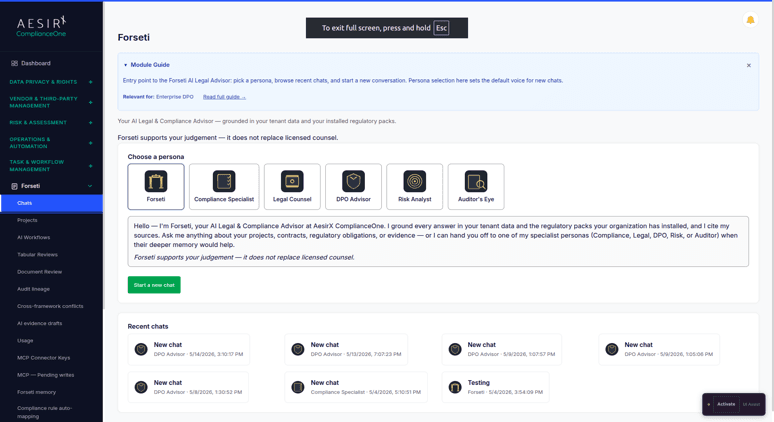
Forseti
Citation-grounded AI compliance advisor available on every package tier
ComplianceOne's built-in AI Legal Advisor. Six customer-facing personas (Generalist plus Compliance, Legal, DPO, Risk, and Audit specialists) provide role-appropriate guidance grounded in the organization's installed regulatory packs. Every claim is tied to a regulatory-search tool result before it reaches the user, and AI-generated evidence drafts require human approval before being marked final.

See Core Modules in Action
Ready to see how ComplianceOne's command center, guided setup, platform administration, and AI advisor work together in practice? Request a personalized demo with your compliance scenarios.

Tu Pham - Country Manager, AesirX
Head of Risk with 15+ years in fintech and banking across ERM, compliance, fraud, audit, and regulatory frameworks.
Next Steps

Start a Compliance Pilot
Configure the Dashboard, Onboarding paths, and Platform settings for your team in a structured 30/60/90-day pilot with real users.

Discuss Your Compliance Needs
Walk through your team structure, role configuration requirements, and dashboard priorities with a compliance specialist.
Frequently Asked Questions
Core Modules are not just settings. They provide the operational foundation for ComplianceOne: visibility, guided setup, access governance, contextual help, and AI-assisted compliance guidance.
Yes. Dashboard, Onboarding, Help Center, Platform, and Forseti are all included from the Light tier up, which means they are available on every ComplianceOne package. Standard and Enterprise tiers inherit all Light modules. The only cross-tier variation in Core Modules is Forseti's monthly token allowance: 100K on Light, 500K on Standard, and 5M on Enterprise.
Yes. Dashboard filtering, platform configuration, regulatory-pack-aware AI guidance, and role-based workflows are designed to support organizations working across multiple regulatory frameworks.
Yes. The Widget Configuration Panel lets users show, hide, collapse, and expand individual widgets. Preferences are saved per user in the browser, so each team member's layout persists between sessions. The Framework Filter is also user-controlled, allowing each person to scope their dashboard to the regulation most relevant to their current work.
Each team member is guided through the onboarding path that matches their role. An Enterprise DPO follows the DPO path with recommendations for DPIA setup, consent governance, and rights request configuration. A Department Data Owner follows a different path focused on contribution workflows. Ten paths cover all 10 platform personas, so every team member receives guidance relevant to their actual responsibilities rather than a generic product tour.
No. Forseti supports legal and compliance teams with citation-grounded guidance and draft assistance, but final decisions, legal interpretation, and evidence approval remain under human control.


The evolution of Aesir is Aesir +  (the Norse symbol for Necessity)"Needed in order to achieve a particular result"
♥Join the AesirX Privacy Newsletter. Stay Informed. Stay Compliant.