

DPO Radio

CATEGORY BASED CONSENT
Category Based Consent groups all plugins, scripts, and pixels into clear categories so nothing runs until visitors choose what they want to allow.

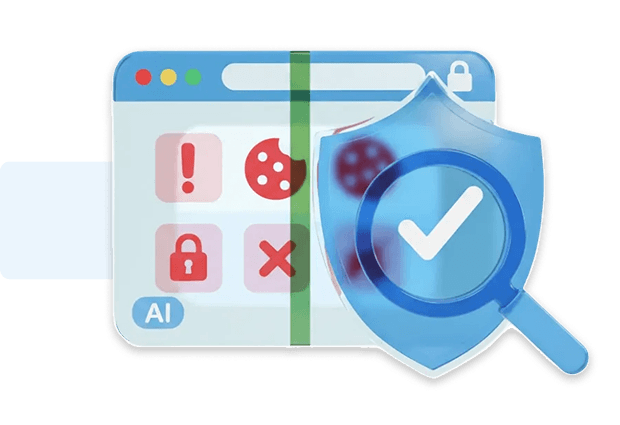
Many consent solutions lack proper tracking categorization, which means scripts, pixels, beacons, and other tracking technologies often fall outside the categories displayed in the banner. On WordPress sites, this creates a clear gap: tracking can still run even when categories appear disabled simply because those technologies were never placed into a category at all.
Category Based Consent fixes this by allowing WordPress admins to manage all tracking technologies within Consent Shield under clearly defined categories such as Essential, Functional, Analytics, Advertising, and Custom. Every script, plugin, pixel, and domain can be assigned to a category, giving users a structured and transparent view of what each category contains.
Before any tracking is allowed, visitors choose which categories to enable, or they can use the Customize view for more granular control. If a user later revokes consent, everything in that category is immediately disabled. This creates a consistent, enforceable consent model that aligns user choices with the actual tracking behavior on WordPress websites.
Built for organizations where data protection meets performance

Applies clear category rules across all tracking.

Organizes analytics trackers under simple categories.

Separates essential tools from optional tracking.

Categorizes advertising trackers into defined groups.

Groups non-essential tracking transparently.

Keeps tracking technologies separated by purpose.

Provides structured categories for reviewing tracking.

Groups marketing trackers into clear, user-facing categories.
Category Based Consent blocks WordPress plugins until a visitor grants consent, either for that category or for the individual plugin.


Category Based Consent uses your category assignments to decide which WordPress plugins load before consent and which are blocked until a user opts in.
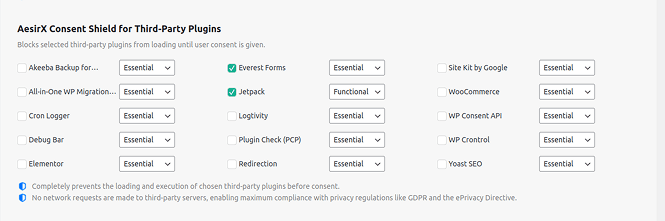
 Review category assignments after new installs or updates so plugin behavior stays accurate.
Note that AI Auto-Blocking works for plugins and scripts loaded through WordPress’ standard architecture. Scripts hardcoded in theme files are not detected and must be added to blocking rules manually


 Tracking scattered across tools
 Tracking grouped logicallyUsers face unclear choicesUsers choose clear categoriesScripts behave inconsistentlyScripts follow category rulesRevoking leaves gapsRevoking stops whole groupsRules differ per pluginOne model for all tracking
 Visible category choices
 Consistent blocking behavior
 Transparent tracker list
AesirX Consent Management Platform (CMP) for WordPress v1.3.0 release, introducing category-based and granular consent controls.
READ MORE




Category Based Consent lets you assign each third-party WordPress plugin to a category such as Essential, Functional, Analytics, Advertising, or Custom. Consent Shield then deregisters non-essential plugins before they load on the frontend. Nothing runs or sends data until a visitor opts into that category.
Any plugin assigned to a non-essential category. When blocked, it is fully deregistered, its code does not execute, and it makes zero network requests. This prevents scripts, pixels, or tracking components inside those plugins from running before consent, supporting pre-consent requirements under GDPR and ePrivacy Directive Article 5(3).
If a visitor revokes consent for a category, any plugin mapped to that category remains blocked. It is not reloaded and no code restarts. The block persists until the user opts back in, giving you reliable consent-driven plugin behavior.
Agencies inherit mixed stacks, legacy tracking, and plugins added by past teams. Category Based Consent gives them a structured, editable way to group all plugins under clear tracking categories. This makes it easier to enforce consistent rules, reduce compliance risk, and explain the tracking setup to clients without manually chasing down individual plugin behaviors.
No. It controls entire plugins. If a plugin includes cookies, scripts, pixels, or other tracking components, none of it loads until the user opts into the relevant category. This avoids the common issue where CMPs block cookies but still allow the plugin’s code to run.


The evolution of Aesir is Aesir +  (the Norse symbol for Necessity)"Needed in order to achieve a particular result"
♥Join the AesirX Privacy Newsletter. Stay Informed. Stay Compliant.