
DPO Radio

AI AUTO-BLOCKING
Fast 1-click setup for WordPress that uses real scan data to auto-block third-party scripts, domains, and plugins before consent, removing manual work and keeping setups consistent.

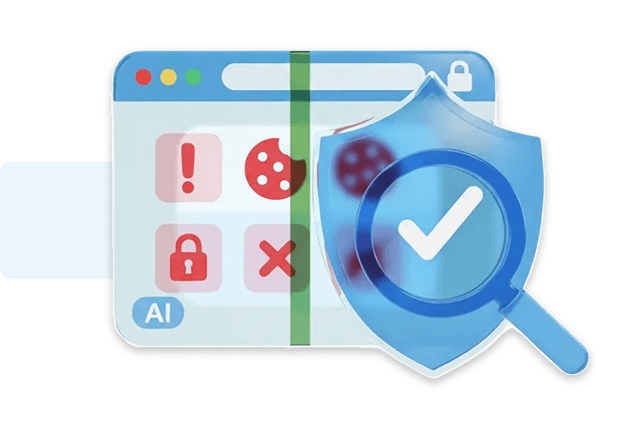
Configuring blocking rules by hand is one of the slowest parts of building a compliant consent setup. Each site has different plugins, embeds, analytics tools, and marketing tags. Tracking behavior changes over time, and hidden scripts often load only after consent. Manually reviewing all of this is time-consuming, prone to errors, and difficult to maintain across large portfolios.
AI Auto-Blocking changes that by turning configuration into a 1-click action based on real behavioral data. The AI Privacy Advisor runs pre- and post-consent scans, revealing exactly which technologies activate only after approval. Those results flow directly into Consent Shield for WordPress and AI Auto-Blocking, which instantly configures domain-level blocking, plugin-level controls, and path rules. No writing rules, no copy-pasting settings, no repeating work across multiple sites.
The result is fast onboarding, faster updates, and a workflow that stays consistent. Setups become predictable and repeatable, even when managing many environments, reducing drift and cutting the risk of missed trackers. Teams spend less time configuring and more time delivering.
Built for organizations where data protection meets performance

1-click blocking that speeds up site delivery.

Quick setup for ad and pixel control.

Faster configuration for sensitive sites.

Streamlined ad-tech blocking workflows.

Reduces third-party exposure early.

Rapid setup for tracking-light environments.

Cuts configuration time for privacy reviews.

Fast control for blocking third-party plugins.
AI Auto-Blocking uses categorized scan data and applies blocking rules when you enable it.


AI Auto-Blocking works using the data produced by the AI Privacy Advisor, which automatically analyses what loads before and after consent.
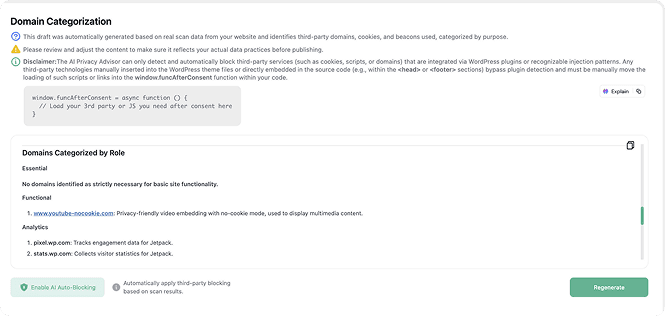
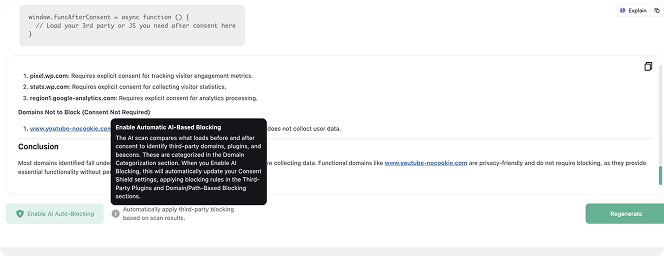
 Press Regenerate after site changes to refresh categorized data before reapplying AI Auto-Blocking.
Note that AI Auto-Blocking works for plugins and scripts loaded through WordPress’ standard architecture. Scripts hardcoded in theme files are not detected and must be added to blocking rules manually


 Manual rules slow to configure
 1-click blocking applied instantlyHidden trackers often missedScan-driven rules catch more issuesSetups differ on every siteSetups stay consistent across sitesUpdates require repeated workUpdates done in a single actionHigh time cost per projectLow effort to maintain long term
 Scan-verified rules
 Behavior-based detection
 Repeatable configurations
AesirX CMP for WordPress v1.9.0 introduces automated scanning and blocking of cookies and beacons using the new AI Privacy Advisor feature.
READ MORE
AesirX CMP JS 1.0.0 brings first-party consent control to any platform, delivering faster, compliant, and privacy-first data management for all websites.
READ MORE
Explore the AesirX Consent Management Platform Features Guide to configure tracking, block scripts, and stay compliant with global privacy laws.
READ MORE




AI Auto-Blocking uses real behavioral data generated by the AI Privacy Advisor, which runs both pre-consent and post-consent scans in Consent Simulation Mode. Anything that appears only after user approval, such as analytics, ad-tech pixels, plugin-injected scripts, or third-party beacons, is flagged as requiring consent under GDPR and the ePrivacy Directive 5(3). These results are then auto-applied to Consent Shield, creating domain blocking, plugin blocking, and path rules without manual configuration. The rules reflect the site’s actual tracking footprint, not generic guesswork, forming a precise privacy AI blocking system.
By blocking non-essential scripts and cookies until a user makes a choice, AI Auto-Blocking supports opt-in consent requirements under GDPR and the ePrivacy Directive 5(3), where tracking cannot start before explicit user approval. For US frameworks such as CCPA/CPRA, which operate on opt-out logic, the feature contributes to transparency by identifying and documenting tracking activity clearly in the consent interface and privacy notices. Its scan-driven workflow aligns with AI-powered privacy compliance, mapping technologies accurately and preventing silent loading in environments requiring clear user controls.
AI Auto-Blocking can only act on technologies that are loaded through standard WordPress mechanisms, like plugins, widgets, and scripts that are properly enqueued via WordPress hooks. When the AI Privacy Advisor detects these domains in the pre-consent scan, AI Auto-Blocking can add them to the blocking rules with 1 click.
Scripts that are hardcoded directly into theme files, page templates, custom HTML blocks, or other non-standard injections cannot be auto-blocked. In those cases, you need to configure blocking manually in Consent Shield (for example, using Script Blocking or Domain/Path Blocking), or refactor the site so tracking loads via proper WordPress plugin architecture.
When new technologies are added, a fresh scan through the AI Privacy Advisor updates the detection dataset. AI Auto-Blocking then regenerates the correct blocking rules based on the site’s updated behavior. This prevents configuration drift and avoids repetitive manual editing across multiple environments. Instead of rewriting rules or managing spreadsheets, the setup becomes a consistent, scan-driven workflow. This model aligns with AI compliance automation, making updates predictable and scalable.
No. Essential services that appear in both the pre-consent and post-consent scan results (such as core WordPress functionality, security components, or strictly necessary cookies) are not included in AI Auto-Blocking rules. Only non-essential technologies like analytics, retargeting pixels, or marketing trackers are added to the automated configuration. This logic supports ePrivacy cookie compliance by separating essential and non-essential purposes according to real behavior, without interfering with components required for the site to function.


The evolution of Aesir is Aesir +  (the Norse symbol for Necessity)"Needed in order to achieve a particular result"
♥Join the AesirX Privacy Newsletter. Stay Informed. Stay Compliant.