

DPO Radio

PLUGIN SHIELD
Block plugin-based trackers at the source by deregistering selected plugins until visitors opt in to that plugin or a grouped selection.

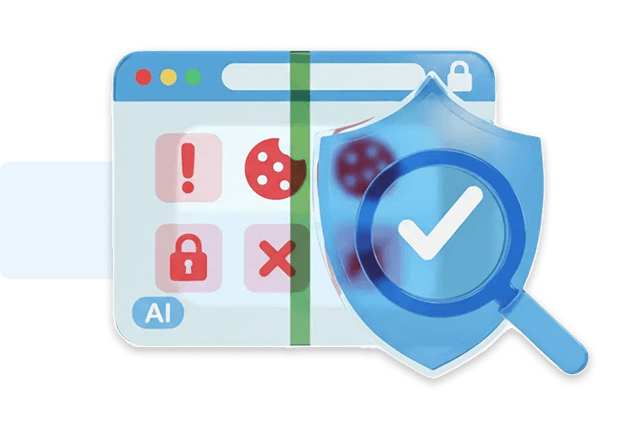
Most tracking inside WordPress doesn’t begin with scripts you add manually. It starts inside plugins. Many third-party plugins activate their scripts, API calls, telemetry, and analytics as soon as the page loads, often long before a visitor can choose their consent settings. This early behavior is difficult to see, harder to control, and creates unnecessary exposure because it runs regardless of the visitor’s intent.
Plugin Shield solves this at the system level. When you assign a plugin to a consent category, Consent Shield prevents WordPress from registering or loading that plugin on the frontend until the visitor opts in. Nothing executes pre-consent: no code, no assets, no outbound calls, and no hidden beacons that plugins sometimes trigger during initialization. It gives you a reliable way to stop plugin-driven tracking without needing custom code or manual audits for every plugin installed.
For organizations and agencies, this results in cleaner, predictable behavior across builds. You decide which plugins are essential, which are functional, and which should wait for user choice. The outcome is a safer baseline where plugins activate only when a visitor has made a clear decision.
Built for organizations where data protection meets performance

Control plugin behavior across varied client setups.

Stop marketing plugins loading on product pages.

Block analytics plugins during sensitive flows.

Prevent plugin embeds and ad tools firing early.

Keep non-essential plugins inactive by default.

Reduce unnecessary plugin activity on patient pages.

Limit plugin-triggered requests on intake journeys.

Stop remarketing plugins loading on booking flows.
Deregister selected third-party plugins on WordPress until the user opts in.


Plugin Shield blocks third-party plugins at the WordPress level until the visitor opts into their category or enables the plugin individually in the consent modal.
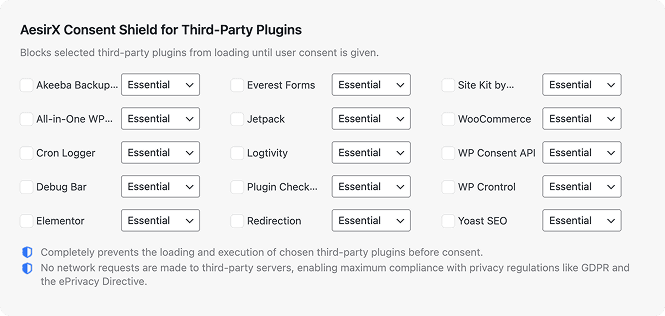
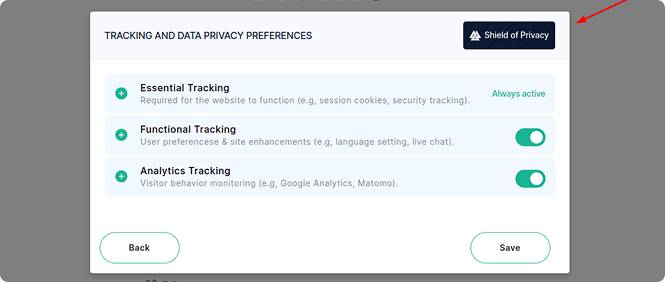
 Run new AI scans after adding or updating plugins so category assignments and user-visible options stay accurate.
Note that AI Auto-Blocking works for plugins and scripts loaded through WordPress’ standard architecture. Scripts hardcoded in theme files are not detected and must be added to blocking rules manually


 Plugins run immediately
 Plugins blocked pre-consentHidden tracking begins earlyNo early plugin trackingUnclear plugin behaviorPredictable loading behaviorNo structured plugin groupingPlugins grouped for clearer choicesUser choices not respectedCleaner user consent flow
 Behavior-first control
 Consistent plugin outcomes
 Transparent consent flow
AesirX Consent Management Platform (CMP) for WordPress v1.3.0 release, introducing category-based and granular consent controls.
READ MORE



Plugin Shield deregisters the plugin at WordPress’ system level, preventing it from being enqueued or initialized on the frontend. This stops the plugin’s PHP output, JS files, SDK initialization, pixels, and outbound API calls from running before a visitor makes a consent choice. Because the plugin never loads, no tracking or telemetry can fire earlier in the page lifecycle.
Both. Agencies can manually enable any plugin they want to control, or they can let AI Auto-Blocking prefill the Plugin Shield list using behavior detected in the AI Privacy Advisor scan. Once a plugin appears in the list, the agency assigns it to a consent category, and Consent Shield handles blocking automatically across all frontend pages.
Standard banners can’t stop plugins from loading, so plugin-based tracking still fires before a choice is made. Plugin Shield stops the plugin itself from initialising. This prevents scripts, SDKs, and beacons from running pre-consent, aligning the site with consent-first requirements in GDPR and supporting stricter expectations under ePrivacy Directive 5(3) without implying legal outcomes.
By blocking plugins until the visitor opts in, Plugin Shield removes early-session noise from analytics. Events, conversions, and pageviews come only from users who have consented, which prevents inflated metrics caused by plugin-driven pre-consent requests. Agencies get compliant datasets that are easier to interpret and more trustworthy for campaign attribution and CRO.
Yes. When plugins are blocked pre-consent, their scripts, styles, and API calls do not load, which reduces frontend weight and prevents plugin conflicts that usually appear during early initialization. Agencies often see faster first-page loads and fewer debugging issues because non-essential plugins stay inactive until the visitor chooses to enable them.


The evolution of Aesir is Aesir +  (the Norse symbol for Necessity)"Needed in order to achieve a particular result"
♥Join the AesirX Privacy Newsletter. Stay Informed. Stay Compliant.