

DPO Radio

CONSENT ANALYTICS DASHBOARD
Understand how people respond to your consent setup with real-time metrics and exportable reports.

Many sites run consent banners without clear visibility into how users actually respond. While consent logs capture whether a choice was recorded, they do not show patterns such as hesitation, partial consent, repeated rejection, or how behavior shifts over time. Without this context, teams often rely on surface-level opt-in rates or assumptions when reviewing consent performance.
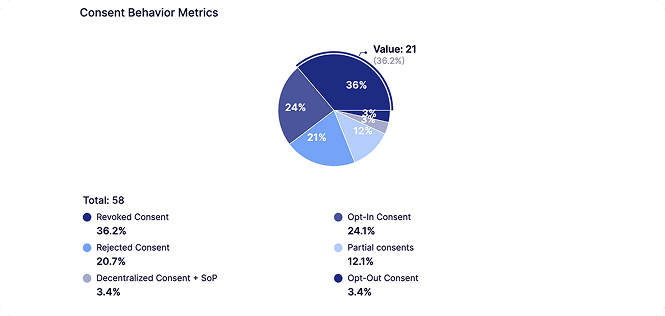
The Consent Analytics Dashboard addresses this by providing real-time, first-party insight into consent behavior as it happens. It visualizes opt-ins, rejections, partial consent, revocations, category-level responses, and regional patterns in a single view. This allows teams to see how people interact with consent settings across pages, categories, and regions, rather than treating consent as a one-time event.
From a practical perspective, this helps teams understand where consent experiences are clear, where friction may exist, and how changes in text, structure, or context affect user response. The dashboard supports evidence-based discussion and reporting by turning consent interactions into measurable behavior. Over time, this visibility reduces guesswork and helps teams manage consent experiences with confidence and clarity.
Built for organizations where data protection meets performance

Clear visibility into real consent trends.

Insight into how shoppers respond to tracking categories.

Transparent behavior data across sensitive journeys.

Reader interaction insight for refining consent UX.

behavior reporting aligned with public transparency needs.

Pattern clarity on pages where trust is critical.

Structured reports to support documentation processes.

Behavior insight across varied visitor regions.
Visualizes real-time consent behavior using privacy-first signals and exportable reporting.




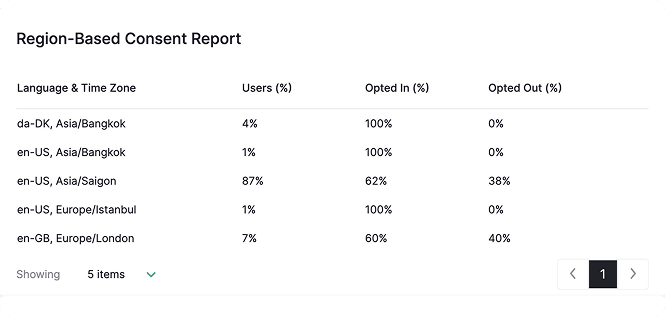
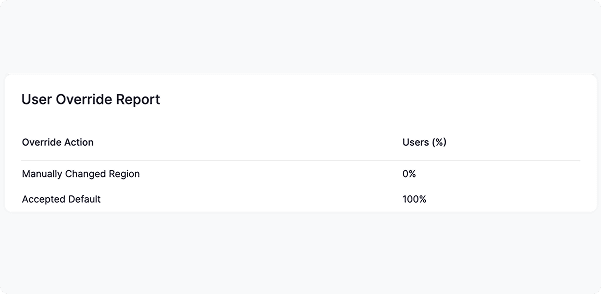
The Dashboard collects each consent action and summarizes behavior across categories, regions, and interaction types. It shows opt-ins, rejections, partial consent, and revocations, plus region logic and user overrides, giving a clear view of how people respond to your consent setup.

 Compare metrics before and after small text changes so shifts in acceptance or rejection remain meaningful and easy to track.
Note that AI Auto-Blocking works for plugins and scripts loaded through WordPress’ standard architecture. Scripts hardcoded in theme files are not detected and must be added to blocking rules manually


 No clear view of consent trends
 Live visibility into behaviorHard to understand category behaviorCategory-level insight in one viewManual evidence gatheringInstant exportable recordsBlind UX adjustmentsData-backed UX refinementsSlow responses to stakeholder questionsFaster answers backed by metrics
 Real-time clarity
 Trusted evidence
 Consistent reporting
AesirX CMP for WordPress v1.8.0 adds advanced consent analytics, exportable insights, and 8 new languages – giving WordPress users deeper control and legal readiness.
READ MORE




The Consent Analytics Dashboard displays opt-ins, rejections, partial consent, revocations, category responses, regional patterns, and user overrides using privacy-first signals. This gives you a clear view of how people interact with your consent setup so decisions are based on real behavior, not assumptions.
The Consent Analytics Dashboard gives a detailed picture of how people interact with your consent settings, showing where users engage, hesitate, or reject categories. These insights help identify friction points, refine wording or layout, and improve overall clarity. With this level of visibility, consent behavior tracking becomes practical and actionable, supporting better UX decisions and more consistent handling of consent across digital touchpoints.
Yes. behavior trends in the dashboard show which categories users reject, how often consent is revoked, and how text or layout changes influence acceptance rates, helping you improve consent UX metrics. Clearer UX signals reduce friction, support higher opt-in rates where appropriate, and give teams a measurable way to test consent wording or design choices instead of guessing.
The dashboard provides category-level consent metrics, showing acceptance and rejection rates for Analytics, Advertising, Functional, and Custom categories. It highlights which groups users are most likely to reject, how behavior shifts over time, and where category text may need refinement. This helps teams improve clarity, reduce friction, and adjust their consent strategy using real behavior rather than assumptions.
The dashboard uses browser language and time zone to show regional opt-in and opt-out patterns, giving clear insight into how different jurisdictions respond to your consent setup. These consent behavior analytics help teams compare models, support localization decisions, and understand how Geo-Handling rules influence real user behavior.


The evolution of Aesir is Aesir +  (the Norse symbol for Necessity)"Needed in order to achieve a particular result"
♥Join the AesirX Privacy Newsletter. Stay Informed. Stay Compliant.