

DPO Radio

CONSENT LOG
Record each consent action in an immutable log with timestamps and export-ready entries for transparent documentation.

Consent Log provides a complete and verifiable audit trail of all consent activity. It records who gave consent, when it was given, and under which conditions, helping organisations maintain transparency and demonstrate compliance with GDPR and similar regulations.
The log combines visual insights and detailed records. Teams can view daily, weekly, or monthly consent trends in bar charts, analyse consent types through pie charts, and export raw data for compliance reporting, audits, or internal analysis.
Each record includes key metadata such as timestamp, consent status, expiration, consent text versioning, Shield of Privacy (SoP) ID, wallet reference (if used), UUID, and IP address. Consents automatically expire after six months, and expired records trigger a fresh consent request to keep entries aligned with current conditions. This means consent can be traced, reviewed, and validated over time, while supporting clear retention and governance policies
Built for organizations where data protection meets performance

Clear consent records across multiple sites and clients.

Evidence for consent changes.

Historical consent records .

Proof of consent states for advertising and analytics reviews.

Traceable consent history.

Logged consent events supporting sensitive data interactions.

Exportable consent records for review.

Consent history for website visitors.
Records consent actions as they occur, creating a structured audit trail for review.




Consent Log records each consent-related action when it occurs and organises the data into time-based summaries, consent state distributions, and detailed log entries for review and export.
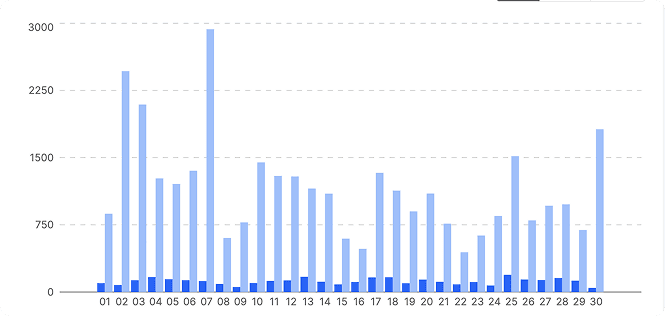

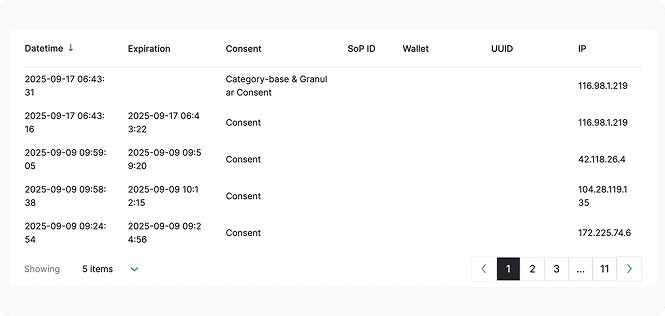
 Use the Export button in the top-right corner to download raw consent log records for review or sharing.
Note that AI Auto-Blocking works for plugins and scripts loaded through WordPress’ standard architecture. Scripts hardcoded in theme files are not detected and must be added to blocking rules manually


 Consent history pieced together from summaries
 Consent actions recorded when they occurChanges lack consistent timestamps or contextTimestamps provide a clear event sequenceDisputes rely on reconstructed timelinesOptional decentralized entries appear when usedAudit reviews require manual interpretationExports support factual review over assumptionsHistorical consent can be unclear or incompleteConsent history remains readable over time
 Audit-ready records
 Clear historical evidence
 Traceable consent timelines
AesirX CMP for WordPress v1.8.0 adds advanced consent analytics, exportable insights, and 8 new languages – giving WordPress users deeper control and legal readiness.
READ MORE



The Consent Log in AesirX CMP is used to maintain a structured audit trail of consent actions. It records when consent is given, changed, or withdrawn, and presents that data through charts and detailed log entries for review and export.
Consent Log records consent events, not unique users. A single visitor may appear multiple times if they update or revoke consent. Charts aggregate these recorded actions over time to show activity patterns.
In AesirX CMP Consent Log, the pie chart percentages show how recorded consent actions are distributed across states such as Consent, Rejected, Opt-Out, and Revoked within the selected period. They describe recorded outcomes, not legal status.
This view helps teams compare how consent choices shift over time, assess the impact of banner design or messaging changes, and understand where users disengage or withdraw consent. It is especially useful when reviewing consent performance across multiple sites, regions, or implementations, allowing patterns to be identified without inspecting individual records.
In AesirX CMP Pro, a default 6-month expiration is now applied to all recorded consents. Once expired, the date changes to the expired date in the Consent Log and users are prompted to provide consent again.
In AesirX CMP Pro, if any changes are made to the Privacy Policy, Cookie Declaration, and Consent Request text, the version number will increase within the Consent Log.
This keeps consent records aligned with current content and improves transparency and auditability over time.
No. Wallet-based or decentralized consent shown in the CMP Consent Log is optional and visitor-driven. When used, related fields like SoP ID (Shield of Privacy) or Wallet appear in the log. When not used, those fields remain empty.
Yes. The Consent Log provides Page Export, PDF, Table Export, CSV, and XLS options. These formats allow teams to share consent records with internal stakeholders, external reviewers, or DPO-style roles, review historical activity, and respond to audit or documentation requests without relying only on dashboard summaries.


The evolution of Aesir is Aesir +  (the Norse symbol for Necessity)"Needed in order to achieve a particular result"
♥Join the AesirX Privacy Newsletter. Stay Informed. Stay Compliant.