

DPO Radio

DOMAIN CATEGORIZATION
The Domain Categorization feature takes real scan data, groups technologies by purpose, and adds block guidance so you can review tracking behavior quickly and apply correct consent rules.

Working out what each domain or beacon does is one of the most tedious parts of consent setup. Teams must identify which plugin or script triggered it, decide whether it is Essential, Functional, Analytics, Advertising, or Custom, and judge if it should be blocked before consent. Doing this manually across spreadsheets or browser tools is slow, inconsistent, and often leaves hidden tracking activity undiscovered.
The Domain Categorization feature generates a draft breakdown for you based on real scan data from the AI Privacy Advisor. It lists domains and beacons by plugin, assigns each one to a purpose category, and adds a short explanation plus a “Should Block?” recommendation. The draft clearly highlights Analytics and Advertising domains that typically require consent under GDPR and ePrivacy Directive 5(3), while separating Functional or Custom items that may be treated differently.
You then review and adjust this draft so it matches your actual data practices. The result is a faster, more structured workflow that supports better consent logic across multiple sites without guessing.
Built for organizations where data protection meets performance

Faster audits with plugin-level domain mapping.

Clarifies pixels and attribution domains.

Purpose-based domain clarity for sensitive sites.

Organizes complex ad-tech and analytics flows.

Highlights non-essential third-party calls.

Highlights non-essential domains in strict setups.

Structured inputs for privacy risk evaluations.

Maps booking, analytics, and media domains.
The Domain Categorization feature uses AI Privacy Advisor to turn scan data into clear domain lists.


The Domain Categorization feature takes scan data from the AI Privacy Advisor to identify domains and beacons, group them by purpose, and organize them into plugin-based lists that help you review tracking behavior clearly.
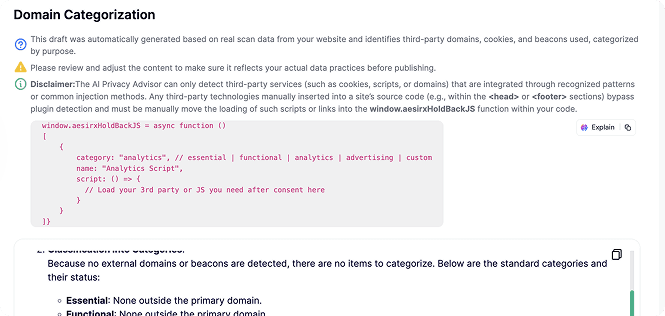
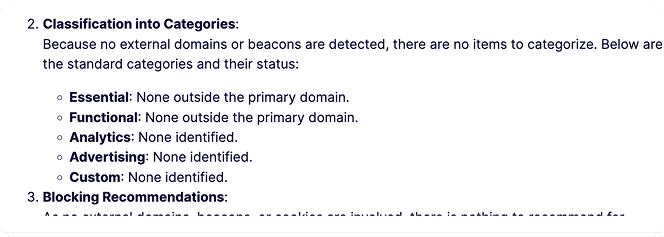
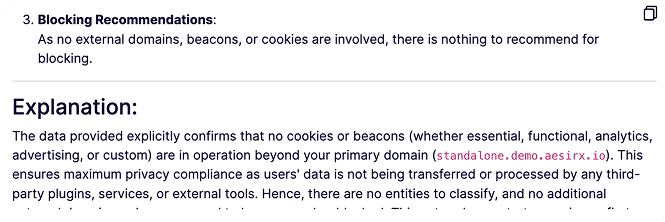
 Rescan whenever plugins or embeds change so domain roles and recommendations stay accurate.
Note that AI Auto-Blocking works for plugins and scripts loaded through WordPress’ standard architecture. Scripts hardcoded in theme files are not detected and must be added to blocking rules manually


 Manual domain-by-domain checks
 Plugin-based lists from real scan dataUnclear why domains are loadedClear explanations for every domainInconsistent consent decisionsPurpose-based groupingHidden analytics and pixelsTracking behavior highlightedSlow reviews across site portfoliosOne structured draft per environment
 Behavior-backed summaries
 Purpose-based grouping
 Transparent recommendations
AesirX CMP for WordPress v1.9.0 introduces automated scanning and blocking of cookies and beacons using the new AI Privacy Advisor feature.
READ MORE
AesirX CMP JS 1.0.0 brings first-party consent control to any platform, delivering faster, compliant, and privacy-first data management for all websites.
READ MORE
Explore the AesirX Consent Management Platform Features Guide to configure tracking, block scripts, and stay compliant with global privacy laws.
READ MORE




It creates a draft list of domains and beacons grouped by plugin, with purpose categories, explanations, and “Should Block?” guidance. The output uses real scan data from the AI Privacy Advisor so you can review tracking behavior clearly.
2. How does the Domain Categorization feature relate to GDPR and the ePrivacy Directive 5(3)?It highlights analytics and advertising domains that typically require consent and separates them from functional uses. This helps you understand which technologies activate only after consent without implying legal outcomes.
Not fully. It detects technologies injected through plugins or recognizable patterns. Items hardcoded into theme files or embedded directly in the page source need to be reviewed and managed manually, for example by moving them into window.funcAfterConsent.
No. It provides categorization and block recommendations. Blocking itself is handled by Consent Shield or AI Auto-Blocking. The Domain Categorization feature acts as the structured input for those decisions.
Refresh the draft whenever plugins, embeds, or marketing tools change. New scans update the domain list, making the categorization reflect current site behavior.

The evolution of Aesir is Aesir +  (the Norse symbol for Necessity)"Needed in order to achieve a particular result"
♥Join the AesirX Privacy Newsletter. Stay Informed. Stay Compliant.