

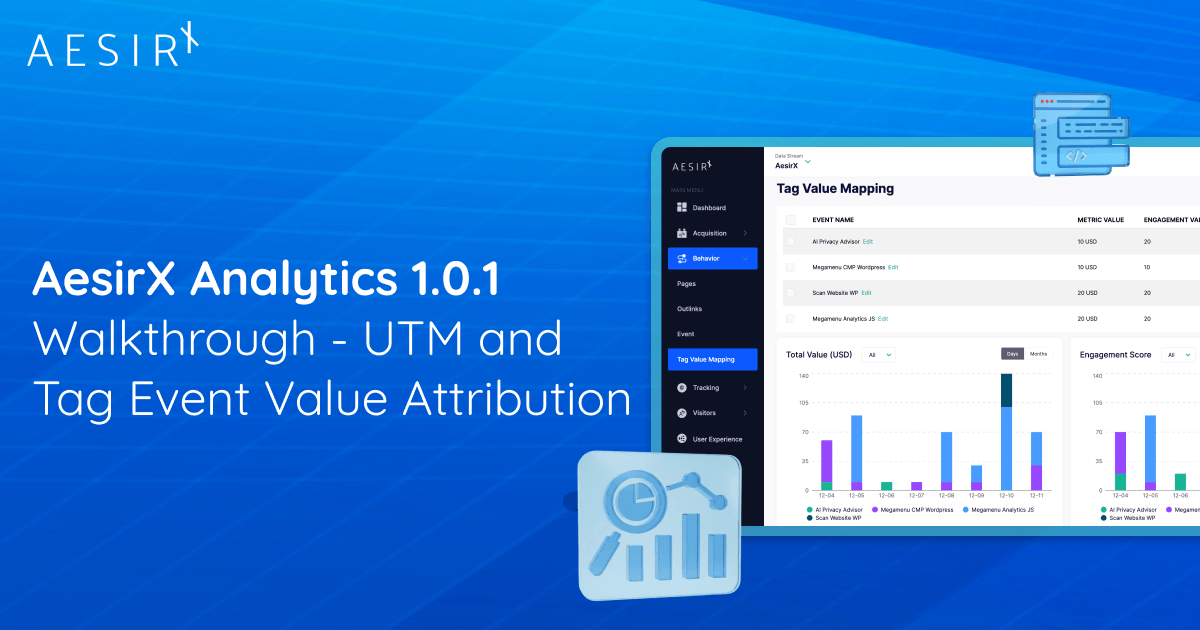
NEW YORK, DECEMBER 12, 2025 – AesirX Analytics 1.0.1 adds Tag Event Value Mapping, so you can assign metric and engagement values to first-party Tag Events directly in the Tag Manager.
The UX Flow now shows a total metric value per journey (UTM + Tag Events) in a new “Metric value” column, while UX Visitor Detail shows the UTM Event first, each Tag Event with its metric value, and a total metric value per session so you can see exactly what high-value visitors did.
Together with 1.0.0’s UTM Value Mapping this gives you full-flow scoring from campaigns to on-site actions today, and prepares the ground for adding conversion-type values next - all inside your own first-party analytics stack running on the AesirX First-Party Server.

AesirX Analytics 1.0.0 introduced UTM Value Mapping - a way to attach real value to campaigns inside your own first-party analytics stack. Instead of just counting clicks, you could finally ask: “How much is this UTM-driven visit worth to us?”
AesirX Analytics 1.0.1 is taking the next step: Tag Event Value Mapping. You can assign metric values and user experience engagement values to on-site actions and see them inside User Experience Flow and Visitor Detail.
Where 1.0.0 focused on where users come from (campaigns), 1.0.1 focuses on what they do on your site (tagged events). Together, they give you an end-to-end view of journey value: from first touch to on-site micro-conversions.
First-party Tag Events: not just “clicks”, but signals of intent
AesirX Analytics already lets you track Tag Events for things like:
- Button clicks and CTAs
- Form submits and newsletter signups
- Video plays or scroll depth
- Add-to-cart actions and other micro-conversions
These events live in our first-party tag management and JS Collector, controlled by your consent rules in AesirX CMP.
In 1.0.1, we let you turn those events into explicit metric and engagement values - so “Newsletter signup” isn’t just an event in a list, it might be “worth 20 points” in your model, while “Product page view” might be worth 5, and “Add to cart” worth 40.
Tag Event Value Mapping: scoring the actions that matter
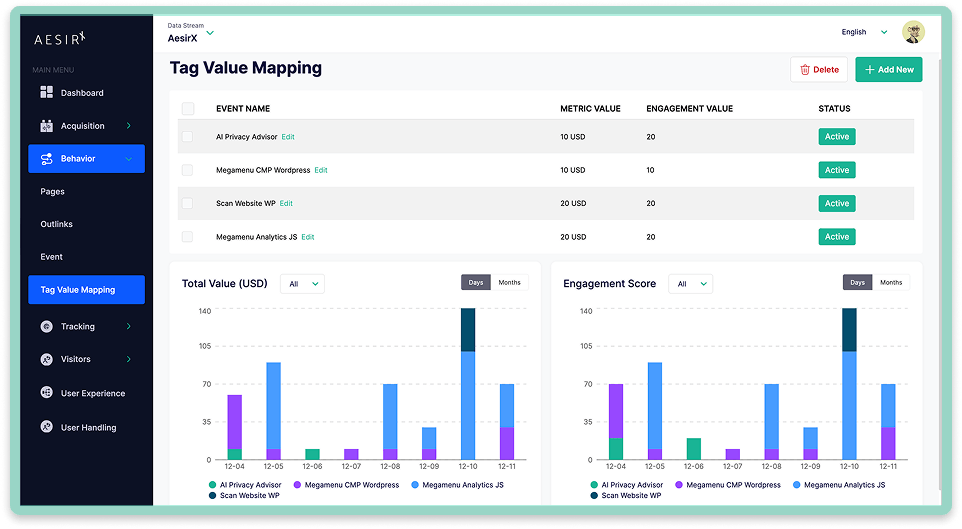
The new Tag Event Value Mapping feature (under Behavior → Tag Value Mapping) lets you:
- Choose which Tag Events you want to score (by tag name or ID).
- Assign a metric value (e.g. 10, 25, 100) to each event.
- Assign an additive user experience engagement score (e.g. 10, 25, 100) to each event.
You can either define these rules centrally in the Tag Value Mapping screen, or:
Set metric values directly when you create a Tag.
That means when your implementer adds a new tag to track a key action, they can also say “this is a 50-point event” right there. No more back-and-forth between code, spreadsheets, and analytics configuration.
UX Flow now shows UTM + Tag Event value end-to-end
UX Flow is the main lens of AesirX Analytics - it shows every real user journey as a visual flow, with an Engagement Score for each path.
With 1.0.1, UX Flow becomes value-aware:
- If a visitor comes from a UTM campaign:
- We show a UTM Event as the first step in their flow, with its UTM metric value (from 1.0.0).
- As they move through your site:
- Every Tag Event appears in the flow with its metric value.
- For each flow, we calculate a total metric value:
- Total metric value = (UTM value) + (sum of all Tag Event values)
- Engagement Score is now computed from the engagement values of UTM + Tag Events in the flow.
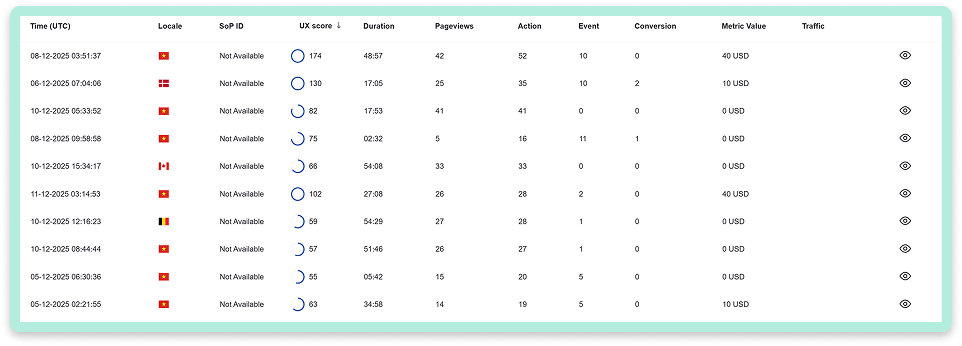
In the UI this means:
- A new “Metric value” column in the UX Flow overview, so you can sort flows not just by visits or engagement, but by total score.
- In the flow detail view, you can see:
- The UTM origin event as the first step (if present)
- Each Tag Event with its metric value
- A summary of the total metric value for that flow.
You go from “this journey is busy” to “this journey is worth 130 points to us, and we know exactly which events created that value.”
UX Visitor Detail: see the story at the single-visitor level
Sometimes you need to drill down to a single visitor/session to understand what happened.
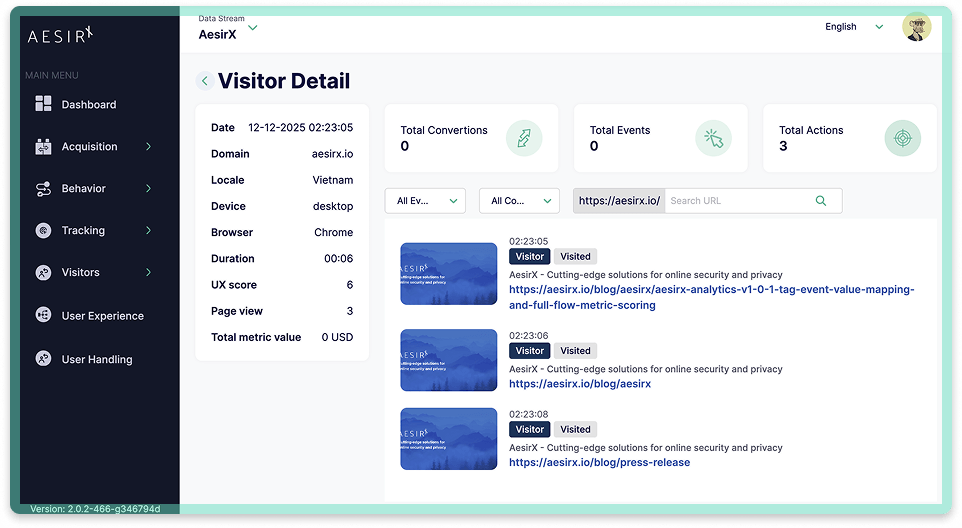
In UX Visitor Detail, AesirX Analytics 1.0.1 now:
- Shows the UTM Event (campaign origin) as the first row in the visitor’s activity list, with its metric value (if any).
- Shows each Tag Event with its metric value in a dedicated column.
- Displays a total metric value for that visitor/session in the side panel.
- Engagement Score for that session reflects UTM + Tag engagement values.
This makes it easy to answer questions like:
- “What did this high-value visitor actually do?”
- “Which sequence of events drove this 100+ point journey?”
- “Are our best journeys coming from the campaigns we think they are?”
And because all of this runs on first-party event data, controlled by AesirX CMP, you don’t have to leak this level of detail to external ad platforms to get these insights.
From campaigns to conversions: closing the loop
1.0.1 is a key step in a bigger plan:
- 1.0.0 - UTM Value Mapping
- Assign value to where users come from (campaigns, sources, mediums).
- 1.0.1 - Tag Event Value Mapping
- Assign value to what they do on your site (tagged actions and micro-conversions).
- Next step - Conversion type value mapping
- Assign value to specific conversion events (e.g. orders, completed signups) and fold that into the same metric system.
Once conversion-type values are added, we’ll have a full circle:
UTM value (origin) + Tag Event value (journey) + Conversion value (outcome)
all inside a single first-party, consent-aware analytics stack.
Still first-party
Nothing changes about the AesirX fundamentals:
- Tag Events are still first-party, collected by the AesirX JS Collector, not 3rd-party tags.
- All data is still stored and processed on your First-Party Server.
What 1.0.1 adds is simply more meaning to the events you’re already collecting - so UX Flow and Visitor views can prioritize the journeys and actions that actually matter to your business.
Release notes summary (v1.0.1 highlights)
| Feature | Benefit |
|
New: |
|
|
New: |
|
|
New: |
|
How to get AesirX Analytics
Get AesirX Analytics and turn every campaign into measurable value.
➡ Setup guide
Explore our ecosystem at: https://www.aesirx.io